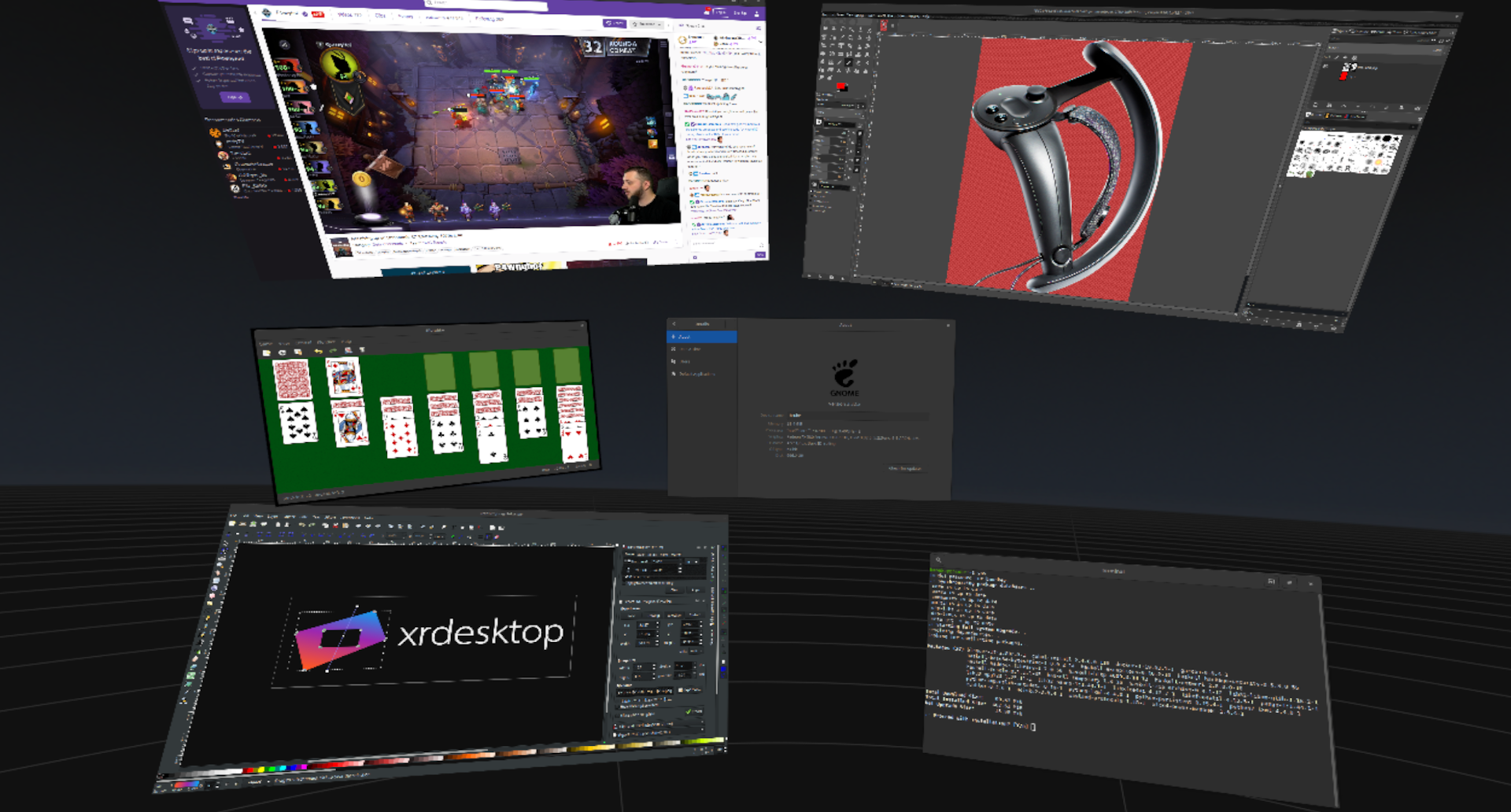
This is going to be another compiz cube. It looks cool, but I doubt it will be very useful outside of showing off some cool tech.
Also Valve tbh have dropped a lot of their more interesting tech. I had one of their steam links which isn't even sold anymore. The steam link was actually pretty useful for steaming anything on your desktop, I am sure you can do the same with a Raspberry Pi and some scripts but it worked pretty well if you hooked up a mouse and keyboard.
Compiz cube was what convinced me to try Linux in the first place - I had always thought of it as a boring server OS, but then I saw the desktop cube and wobbly windows and thought "that looks cool enough to try it out." Hopefully this could have a similar result for some people who have VR headsets.
> I am sure you can do the same with a Raspberry Pi and some scripts
Actually you don't even need to write your own scripts. There is an official steamlink package available for Raspbian. I just set up a Pi3 to run as a dedicated steamlink the other day, and it works fairly well.
Just run:
  apt install steamlink

  steamlink
Edit: And if you want it to run the steamlink interface on bootup, you can stick this in your crontab:
Thanks for the info. I wasn't surprised in the least that there was something out there. I am a nomadic dev at the moment so most of my kit is locked in a warehouse and I am stuck using MacBook pro.
I don’t know that most people would use this, but there’s a definite benefit that a VR headset can give you a grid of six 40” monitors for $400. Or whatever display setup you want. It’s an economical way to get a lot of real estate.
The resolution kills that notion for now, but someday it might become a cost effective setup.
Add a pair of noise canceling headphones and you can pretend your tiny desk is a private office! It even has imaginary walls to hang things on!
I'll add input device and hand/finger passthrough to that. I think the Rift S can do this, assuming you're good with "virtual screens overlayed on camera passthrough" as an implementation.
But if you want to bring it into a fully virtual world instead of on top of the cameras, then you can't see your keyboard, mouse, or fingers. I can blindly touch type well enough to get by, but for it to see any adoption you'll need to get the input devices visible in VR.
Yeah, I bought an extra one when they discounted them to near nothing after they announced they were discontinuing them. It's nice to be able to play games on my bedroom TV when I'm going to bed :)
My issue with the steam link has been the steam controller (I know it's not the only option, but I got the bundle). I just can't get the hang of it. What have other people experienced on this? Does it get better with practice?
I generally use a XBox 360 controller with one of the wireless dongles plugged into the Link. It generally works very well, even for multiple controllers.
I never got a hold of the Steam Controller either. It never seems to do what it's supposed to. I'd love to be able to switch between Controller mode and K/M mode from the controller itself, but it never works. I also hate that it can't seem to just map itself to act like an XBox controller. Generally what happens is the game has no idea what to do with it, and I'm stuck until I get up and go to the computer itself.
I probably don't know enough about it, but I've had it for years and I just can't be bothered.
One of the authors of Simula[1] here (mentioned in this article).
xrdesktop looks very impressive. We've been working on our compositor (in particular: XWayland support) for quite a while. Getting a prototype up and running was relatively easy. But it has been incredibly difficult to get everything actually stable/usable.
I really like multi-monitor setups, and in the limit this can far surpass physical hardware and space limitations. You can scroll more than 360 degrees for a near-infinite workspace. (Just spin around a hyper-sphere repeatedly.)
I really want to see this tech succeed. I'd look like an idiot using this at work, but I'm already sold.
I'm forced to use a Mac at work -- do you know of similar tech for MacOS? I'm gladly going to investigate this at home.
Why do people think this worth trying to implement? Is it because it looked cool in movies like Minority Report? What is the target demographic for this? What is the use case? Why would I want to add additional and unnecessary complexity to my workflow?
I use four monitors at work and two 4K monitors at home. A high-resolution VR setup gives you infinite workspace. Couple that with intelligent auto window management and you can forget moving windows around EVER again -- this is the ultimate mouseless experience that a tiling window manager can't even get close to.
This is a huge productivity gain. The micro context switches that stem from moving between windows and tabs (or worse, virtual desktops each with windows and tabs) goes away. Workspaces become spatial, and you can leverage your brain's innate spatial reasoning to find and organize things.
Physical project workspaces are laid out logically. We've been constrained to screens and haven't had the freedom of doing this for our virtual ones.
Have you done a lot of VR gaming? My eyes are killing me after an hour. I can't imagine doing 8 hours a day. Not saying this everyone's experience, and I'm curious if others are more tolerant of spending long periods of time in VR.
VR resolution drops very quick when you look at something virtual from half meter away. If your virtual screen takes up to 1/4th of your screen for example it will be reduced to ~720p in a vr with 4k resolutipn per eye. Virtual desktops are not really useful as you think.
Plus VR strains your eye really quick and that comfortable to wear for long periods of time
Once VR gets to a certain point, and the resolution becomes so undeniably crisp, we'll want things exactly like this. You can already do this on Windows with Virtual Desktop Streamer and a companion application for either the Go or the Quest (paid application). If you can touch type, it's very easy to strap on the Quest and use it as your primary monitor. Having had this experience, I'm guessing that we're only one or two generations of hardware away from this being a normal way of computing. You know, provided smartphones, tablets, and otherwise proprietary operating systems don't take over first, Brother Oculus included.
1. It looks cool.
2. Minority report, no. Gits, yes.
3. Everybody. Probably nobody.
4. Probably to multi-task. Multiple screens that sort of thing. VR gaming had the same problem in the beginning. Wasn't until games like adrift and beat sabre showed up that it started to finally hit a stride. Or at least a compelling use case (Good VR games to play.).
5. See 1.
This is just like when motion pictures were first invented, and all people could think of to do was to point a camera at a stage and record a play in one continuous shot.
Have you tried Microsoft HoloLens, Virtual Desktop, or BigScreen? It was obvious to me after using them for 30-60 minutes that this is the future of desktops.
I did. Then I spent the weekend with a migraine. IMO, VR isn't worth the effort. I'd rather have my brain directly jacked into the computer, as long as there's an effective firewall available to keep advertising and other malware out of my head.
I have a VR setup and would love a fully immersive desktop environment to develop/program in. The display quality of the new Index (for instance) is sufficient... however, the critical show-stopper is not being able to use your hands to type onto a real keyboard (i.e. augmented reality-ish).
A real keyboard that you can feel and see as you type on. Both hands would need to be tracked (in addition to the keyboard location) using something like leap motion not by wearing some gloves/controllers or attaching anything - no one is going to do any amount of typing on a virtual keyboard.
When there's a good solution to this I suspect quite a few developers will give it a go when they want a fully immersive in-the-zone experience.
Well, it has to get tracked somehow. Or it has to be "calibrated" on every run, in case it was moved slightly when you tried to clean your desk or what have you.
> The display quality of the new Index (for instance) is sufficient...
Is it? Are the lenses that much better? My Lenovo Explorer WMR is 1440^2 px/eye, and thus has a similar angular resolution to the wider FoV Index. Both are RGB, not Pentile. But I find each eye gets a central circular region something vaguely like 300 px diameter where subpixel rendering is worthwhile (I've a custom render stack), and less than 600 px before the lens blurs pixels together. That's 1980's VGA-like resolution. And it gets even worse as objects move in from infinity and thus out of these regions. If you disable the "oh, its an HMD, not a normal display" feature the OP speaks of, you can easily throw up a pixel-aligned test pattern image. The results are... blurry.
So I use DJI's 1080p drone goggles. Readable 5 pt fonts, almost corner to corner. With shutter glasses, because DJI didn't expose the two panel feeds. :/ And reading glasses, because DJI's lenses... sigh. It's a placeholder kludge.
Nreal's 1080p AR glasses could be available in a couple of months.
> the critical show-stopper is not being able to use your hands to type onto a real keyboard
I've been using my unremarkable laptop keyboard since Vive, by doing pass-through AR with a camera gaff-taped to the HMD. With a browser-as-compositor stack, it's two-video-dom-elements trivial. Though I've heard with a SteamVR stack, pass-through latency can be a challenge.
Hand tracking is more problematic. It's a poster child for acquisitions wiping out market infrastructure. The sole hand-tracking survivor was Leap Motion, which fumbled its couple of Apple acquisition attempts. It's been Windows-only, stalled, kind of crufty, and now has finally been acquired, with uncertain consequences for future availability. And one can kludge. But it isn't pretty.
> When there's a good solution to this I suspect quite a few developers will give it a go when they want a fully immersive in-the-zone experience.
And shallow 3D seems to have interesting possibilities for IDEs.
Yes, the lenses on the Index really are that much better. The difference is enormous.
I'm still not sure the resolution is quite high enough that I'd want to use a VR desktop environment, but I absolutely could now, reasonably comfortably.
With something like that integrated into rendering libraries, I'd love to have the field-of-view of a motion-sensitive environment. (I don't actually want pseudo-3D, just a high-res 2D display attached to orientation sensors.)
I've been wanting the option of a VR desktop for a while now. Last I looked, it wasn't ready for prime time, and that's still my impression now. I find a small 16:9 screen pretty unacceptable for coding, and the market currently offers very limited options for anything taller in a laptop.
I'm eager to see where this goes, and may need to start shopping for a head-mounted display.
The current generation of headsets is unsuited for showing large amounts of reasonably sized text. The display resolution is not there yet. If you map your desktop into a plane in VR space at the proper distance, your UI text shows up heavily aliased and barely readable due to the texture resampling that happens in that process. You need to increase resolution by another factor of two or three to make that actually convenient.
And then there is the issue with holding 3d pointing devices for prolonged amounts of time. This is taxing upper body strength if you do. The weight of thenheadset itself is also straining the neck muscles.
All of this taken together usually means that I want out of VR after about 2 hours. I barely have sessions that are longer.
> And then there is the issue with holding 3d pointing devices for prolonged amounts of time. This is taxing upper body strength if you do. The weight of the headset itself is also straining the neck muscles.
You could use a real mouse and keyboard, if you're presented with some kind of virtual workstation. And even for navigation outside the workstation, of your broader "environment", 3D video games have been using a mouse & keyboard to navigate complex interfaces & environments for a long time, with more than a little success. Granted that means you still need a surface of some sort, but I think non-touch-typing text input inside a VR space would be kinda hellish anyway, so you're at least gonna want a real keyboard regardless.
Navigation in VR is a barely solved problem. Most games have players teleport between positions instantly because a continous motion would create a sensation of conflict between balance reported by the inner ear and the perceived motion. That means instant nausea.
Positioning objects in 3D precisely and conveniently without a 3D pointing device is hard, too. The best option for that is a mouse and crutches like handles oriented along coordinate axes. But that only works because the mouse pointer has a reference plane it moves on (the projection plane for the 3D view). In VR, this plane is tracking the head precisely. You cannot reasonably put the mouse cursor on that plane. You would need a different reference plane and then you're back to all the problems that 3D input on a 2D screen has. And a positioning objects in 3D with a keyboard is even more tedious.
They wrap around your hand, so you can type (ish) and not take them off.
I'd think it would be fantastic to physically walk around to different monitor/window/server setups (in VR), though, and that'd require dragging around a rolling standup desk, or figuring out how to type based on finger positions from the controllers (which I'd imagine would be decidedly not great).
What's the resolution of the headset you've been using?
I don't think I'd like my desktop to have a lot of 3D features or require a 3D pointing device. What I'm imagining is essentially a giant 2D workspace where I can still use a Trackpoint.
I've used or tried most of the major headsets available in the market. None of them is remotely close to a resolution where reading reasonably sized text isn't straining.
The large screen concept is a bit problematic. A large planar screen distorts the portions you're not in front of because you're only seeing them at pretty extreme angles. A cylindrical screen distorts projected content, e.g. photos or 3d graphics displayed on it. A better solution would be to treat each window as a flat rectangle that can be freely positioned in 3d. So you can arrange the most important window around you in ways that you can conveniently look at them by turning your head and you'd still look at them dead on. For implementing that, a 3D pointer is by far the best option.
> I've used or tried most of the major headsets available in the market. None of them is remotely close to a resolution where reading reasonably sized text isn't straining.
I use DJI's 1080p drone goggles. With DIY shutter glasses, because DJI didn't expose independent panel inputs. :/ It looks like a 3D TV screen, not VR, but you get readable small fonts from corner-to-corner (almost, depending on whether you also need to use reading glasses with it). But with batteries, they indeed aren't light weight.
Nreal's AR glasses could be available in a couple of months.
> problematic [...] angles [...] positioned in 3d [...] arrange [...] around you
The skeuomorphic design phase with phones was a short-lived part of onboarding an untrained user population. For non-novice professional user interfaces in XR, I suggest it's... silly. :) But oddly reoccurring, perhaps because of game tooling's availability?
What I wrote has nothing to do with skeuomorphism, only with human anatomy, perception and pretty basic geometry. I am not proposing that windows get rendered with 3d modelled grips for grabbing and moving.
When an artist draws with a display-less graphics tablet, the hand is in one place, but they watch and use an abstraction of it on a display, displaced in space, orientation, and scale. It can take some getting used to. Touchpads and cursors have similar non-trivial relationships. And similarly, there's no reason for your hands to be positioned at the end of your arms (as with "throwy hands"). Nor, with non-novice users, need any other physical correlation be maintained if it's useful to ignore it.
When you use office apps, there's little attempt to maintain physical-world properties like say object permanence. Delete a word, and it "goes someplace, because it can't just vanish"? That would be silly. There's no need to emulate physical paper, or pens, or rubber erasers, or cut-and-paste with an xacto knife, paper fragments, and gooey paste from a jar. It can sometimes be useful or artistically fun to do so, but that's a UX choice.
Or say you're looking at a whole-desktop "window", placed uncomfortably close and large, to be readable despite current HMD's limited angular resolution. When you turn your head, how much does it move? With what velocity profile? And with what alterations in appearance? Skeuomorphism suggests it appear as a real physical object, nailed in space. I found I preferred a quantized 2-3x displacement, to reduce head motion, and enabled it by transiently increased transparency (including "comfort mode" clipping from fov), with slightly delayed motion and added jiggle, so other visual cues could dominate wrt balance. And the shape distorted to maintain pixel alignment, because given my weak gpu, alignment was worth more than temporal antialiasing when reading small fonts. YMMV, as just what combinations of cues are fine vs intolerable varies so much among people.
The common thread is aphysicallity. Skeuomorphism can be useful when onboarding novices, but is later often largely abandoned. As with phones. With the current focus on immersive games and novices, that second part tends to be neglected. I joke that while I use XR hardware, I'm not doing XR, because being focused on non-game non-novice UX, and using a custom non-gaming stack, I've no allegiance to the "R", to Reality. Resemblance to reality as UX design smell.
Skeuomorphism is the wrong word for what you are criticizing, I think.
You are talking about an simulated non-physical world that makes no semse at best and I'm certain that it is just a nausea and disorientation simulator for almost every single user if I understand your thoughts correctly. The thing with VR is that it messes with expectations about the physical world that people process subconsciously. Break them ever so so slightly and people react involuntarily to it. There is
no consciously controllable component to getting uncomfortable in VR.
Just wanting to point out, "...nausea and disorientation simulator for almost every single user" is quite the exaggeration. I have demo'd the Vive at several schools, businesses, among friends/family, and a significant portion of people had no problems with flying or "sliding" control schemes.
One curious personal observation: out of the ~10 Asian coworkers who tried the Vive, all experienced some degree of motion sickness related discomfort.
What about a flat rectangle that's automatically facing the user's face as if pinned to the inside of a sphere? Whatever window you're facing should have the right orientation.
Leaning in is not ergonomic over longer periods of time and may be very undesirable in constrained spaces. I find myself actually doing that a lot when interacting with the desktop in VR and it becomes physically straining after a few minutes.
Yes. If anyone knows of any existing code to support say 3D cross/parallel-eye stereo views, with z-axis displaced words, in an emacs buffer being actively edited, I'd like to hear of it. Teaching your window manager to be 3D is fun, but the next step is to teach your apps.
You are welcome to try, but I can tell you right now that a UI that places words in a text at different depths is a terrible idea. Depths is simulated by varying parallax and vergence. And forcing a permanent vergence adjustment is a strain on the eye muscles. Plus you get to enjoy the vergence-focus mismatch from the fixed headset focal distance to the fullest. This is a headache-inducing cue.
Which is why you keep your primary text plane at focus depth, and emphasize shallow 3D displacement. You can do a lot with a mere cm of depth around your laptop screen, or a similarly scaled annulus at an HMD's 2 meter focus distance.
Hmm. For VR HMDs, with RGB subpixels (non-PenTile), you can read a pixel-aligned 5 pt character in the center, but you don't get many of them (because of lens blur, and just VR lensing), and the pixels are a bit large. I've no idea how well SteamVR/Unreal/Unity currently let you use them. The lenses of Valve's Index were praised elsewhere here.
AR HMDs trade narrower FoV for angularly smaller pixels, and you can use "all" of them. But the pixels may be poorly aligned between eyes, as with Project North Star. Maybe Hololens 2 (with different a-v issues). I can't comment on Magic Leap. I look forward to trying next month's/year's Nreal glasses.
Media-viewing and drone HMDs offer a screen at some distance. Some are stereo 3D. Some are 1080p. Few have head tracking. You can add it with Intel t265, Zed, Structure Core (no linux), or DIY. Many have a "diopter" adjustment. They've varied build quality, and supported nose sizes.
Some months back, I failed to find a 3D 1080p HMD, and so currently use mono 1080p DJI drone goggles (discontinued cheaper white model), with anaglyph (crushing the color space to reduce eye strain) or DIY shutter (flickery 30 or 20 Hz) to recover 3D. :/ Usually with reading glasses, despite my old eyes being nearsighted, which costs some edge pixels. DIY optical tracking, so no temporal antialiasing. I'd not recommend it.
My current hope is for a Q4, 1080p, 50-ish degree FoV, 3D "screen" HMD (media-viewer or AR). With either head tracking built in, or COTS. It may need a Windows box in support, especially for hand tracking. I'll likely stay with a simple custom browser-as-compositor stack, for low-cost pixel-precise control, but a mainstream VR or AR stack might work too.
When one does software development, one might use a variety of media. Technical pen on paper for design-space and architecture graphs. Whiteboard. Whiteboard with colleague. Notes. Exploratory code. And so on. So one question to ask is, here comes consumer VR and AR, and what might these new media offer to justify their place in this tool collection? That takes exploration.
Another question to ask is, given hardware with 3D tracking and display, how might you usefully tweak your existing tools to leverage that?
Rather than reinventing wheels, languages, keyboards, etc, I like the approach of augmenting what exists. And I use emacs a lot.
TensorFlow posenet-based head tracking is easy.[1] And wiggle 3D, and anaglyph shaders, aren't hard. And making DIY shutter glasses (arduino, phototransistor, and Adafruit light valves) was surprisingly simple. So my generic thinkpad screen can do jittery, washed-out, or flickery 3D. And electron/node.js/v8 can serve up low-latency video of the desktop, to be sliced and diced. So an app can provide two or three eye views, in separate windows or time multiplexed, and it can be shown as 3D. When last I tried to do that separation in emacs, I timed out, still unsure if there was a viable path. Thus my query.
Another thing one might try is to overlay graphics. An emacs could have an arbitrary backchannel chat with the compositor, and draw 3D lines and such on itself. And of course control its own window positions and orientations, fragmentation and coalesce. ;)
If you have red-cyan anaglyph 3D glasses, you might enjoy toying with https://atom.io/themes/anaglyph-syntax - but trading color space for depth is a steep price.
> What would you use this for?
So basically for exploration. What might our tooling now look like, if we'd had 3D display and tracking in widespread use for the last two decades?
I care more about vertical resolution, and vertical height, more than about aspect ratio. So with 3k and 4k getting more popular on higher end laptops, the 16:9 doesn't bother me as much. I can keep a code window on one side and documentation (or program output) on the other side of the screen.
The only other drawback of 16:9 is that in order to get an acceptable height, it makes the laptop too wide. My solution is to use clip-on reading glasses over my regular distance prescription, when using a high res laptop screen.
I can imagine that solution working, but what I'd really like to see is some serious business laptops offering 3:2 screens, or 16:12 for that matter. The screen from the large iPad Pro would be perfect on a laptop.
I can sort of see this as an incentivizing stepping stone through generally alternate 3d interfaces to to really get at AR desktops, which could be used in conjunction keyboads and gestures which is alot more viable to even code with/in.
I really wish the "Yay, linux on the desktop" crowd would rally around ChromeOS. ChromeOS is literally what the "linux on the desktop" crowd has been wanted for decades now.
What...why? I'm perfectly happy using linux on the desktop as my full time OS, as I have for more than a decade. I tried ChromeOS on chromebooks, and see nothing they offer me that I don't already have. Not to mention the privacy implications of using such an OS...
The vast majority of Chromebooks are completely useless without Google services. That's not exactly the "freedom" that the Linux community envisioned when they spoke about "The Year of Linux on the Desktop".
And then you've just got an underpowered Linux laptop.
Chromebooks are great for what they are. Fantastic for people that just need access to the web. They're pretty much immune to the technically-challenged.
You certainly can if you install Linux on your Chromebook. I've been using my Chromebook this way for years. But I use a real Linux distro independent of Google (my system will not run Android apps). I have no idea if Google's relatively recent Linux offering works as well.
Chrome OS doesn't give me the benefits that drive me to sometimes use the Linux desktop, so it doesn't really matter whether it addresses any of the (many, serious) problems that keep me from using Linux for everything.
Looks like its hardware support is limited to the point of being nearly useless (under "check what's not supported yet"). Besides, then you've still got spyware under your Linux, so at that point just run Win10.


Also Valve tbh have dropped a lot of their more interesting tech. I had one of their steam links which isn't even sold anymore. The steam link was actually pretty useful for steaming anything on your desktop, I am sure you can do the same with a Raspberry Pi and some scripts but it worked pretty well if you hooked up a mouse and keyboard.